
Most glass companies lose money in the re-typing: the same dimensions entered into the quote, the order sheet, the cutting list and the stock file. Glass ERP software exists to make you enter an order once.
Each copy is a chance for a wrong millimeter, a missed delivery or an hour nobody billed.
By the iSoftGlass team · Updated October 2026 · 8 min read
What is glass ERP software?
Glass ERP software is business software for glass companies that connects quoting, orders, production, stock, delivery and reporting in one system, so every order exists once and every team works from the same data. Unlike a generic ERP, it understands made-to-measure glass: dimensions, glass type, thickness, hardware and processing. It is the business-wide side of glass manufacturing software.
The general term is defined as the integrated management of main business processes, often in real time and mediated by software (Wikipedia, ERP). The glass version applies that idea to made-to-measure products.
Quick answers
- What it does: one order record from quote to delivery, shared by office, production and management.
- What it replaces: spreadsheets, paper order sheets and separate tools for quoting, stock and reporting.
- Core modules: quoting, order management, production tracking, inventory, reporting and complaints handling.
- Who needs it: glass processors and installers who quote made-to-measure products and track orders.
- In iSoftGlass: glass ERP software from €60 to €150 per month in October 2026, with a 14-day free trial and no setup fees.
What does disconnected work cost compared with glass ERP software?
The cost of separate tools is rarely on an invoice. It is time spent copying data. A simple way to size it:
Yearly cost of re-entry = orders per week × minutes re-entered per order ÷ 60 × 52 × hourly cost
Illustrative example (made-up numbers): 40 orders a week, 15 minutes of re-entering per order across the quote, the order sheet, the cutting list and the stock file, at €15 an hour. That is 10 hours a week, about 520 hours a year, or €7,800 a year, before counting a single remake caused by a typing error. Replace the numbers with your own.
The worry is not only about time. A study of 50 operational spreadsheets by Powell, Baker and Lawson found errors in 47 of them, a 94% rate under their inclusive definition (Journal of Organizational and End User Computing, 2009). Order sheets and price lists kept by hand are exactly this kind of file.
Glass ERP software vs spreadsheets: a direct comparison
| Task | Spreadsheets and separate tools | Glass ERP software |
|---|---|---|
| Quoting | Dimensions and prices entered by hand, formulas copied between files | Dimensions and options produce a priced quote automatically |
| Order record | Quote, order and cutting list kept in separate files | One order with a status from quote to delivery |
| Production | Paper sheets or messages to the workshop | Production sheet generated from the confirmed order |
| Stock | Counted manually, updated when someone remembers | Reserved and updated as orders move, with low-stock alerts |
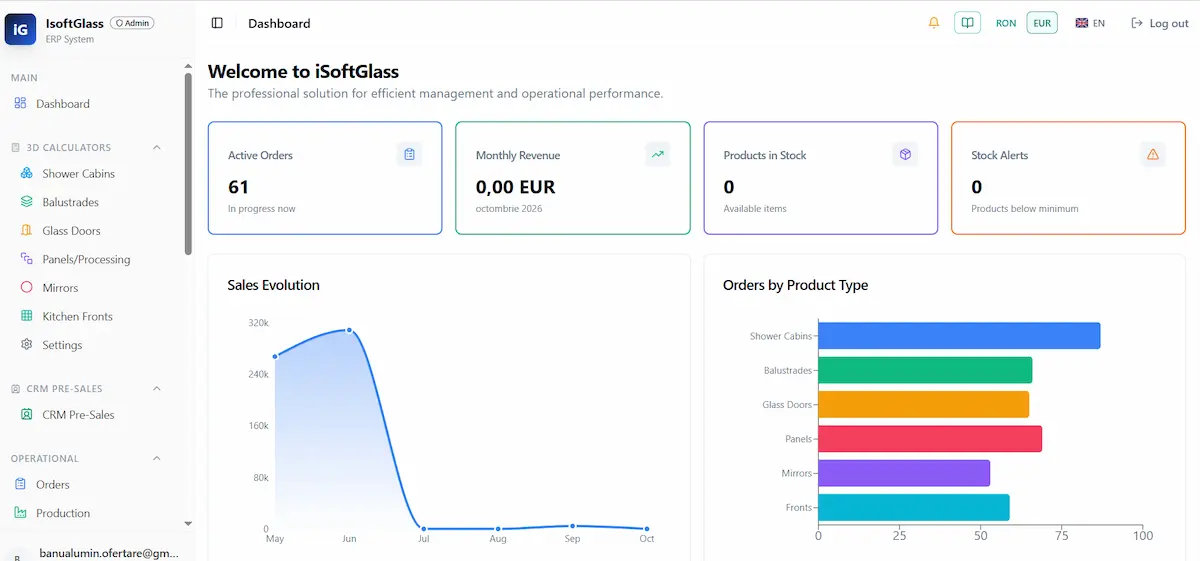
| Visibility | Ask the person who knows | Dashboard of active orders, revenue and stock alerts |
| Errors | Each re-entry can introduce one | Data entered once and reused |
| Growth | More files, more people who must know where things are | Same system, more users |
Which modules should glass ERP software include?
Names differ between vendors, but a glass ERP software worth paying for covers six areas. Weak spots in any of them send people back to spreadsheets.
1. Quoting and product configurators
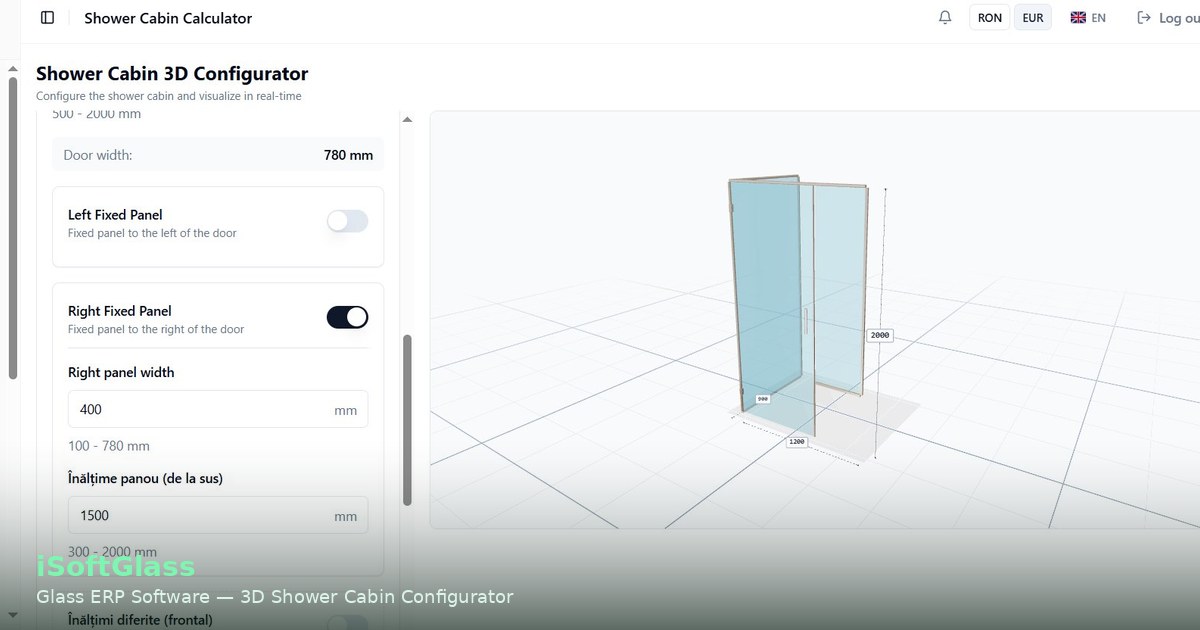
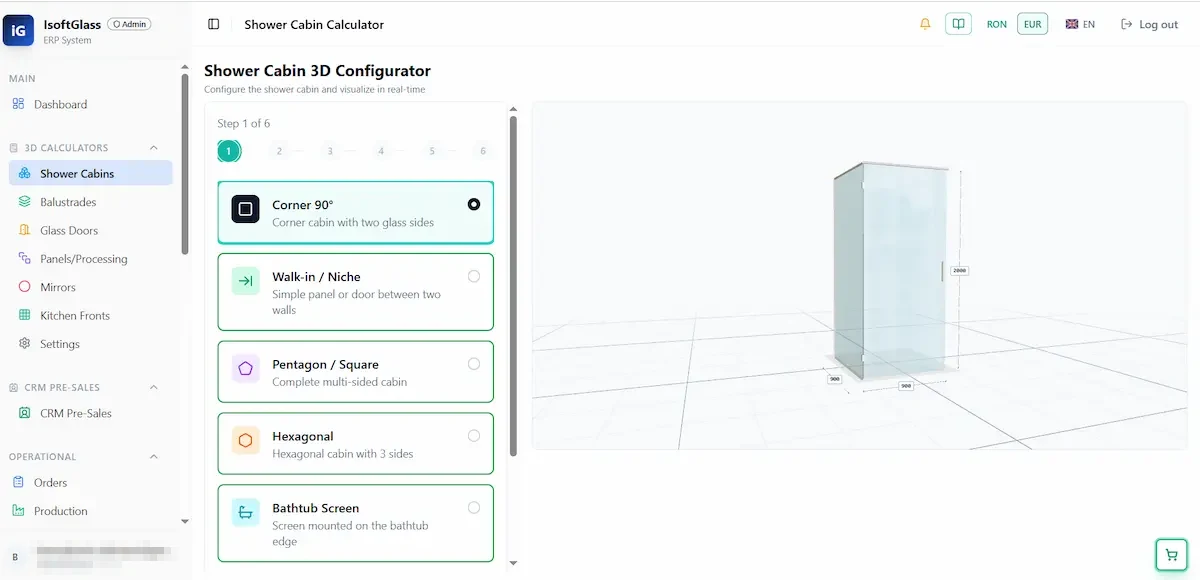
Made-to-measure products need rules, not free-text fields. Look for calculators or configurators that know your products, such as shower cabins, balustrades, glass doors, panels, mirrors and kitchen fronts, and that turn dimensions into a priced, production-ready quote.
2. Order management
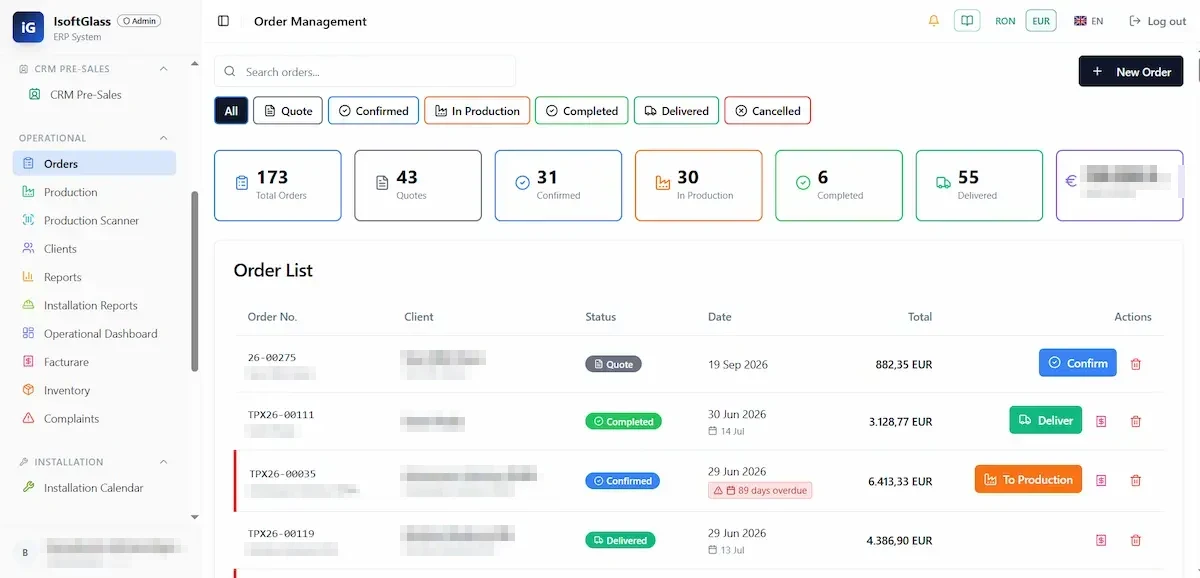
Every order should carry a status from quote to delivery, with overdue alerts and a clear hand-off from sales to production. Confirming an order should create the work for the next team.
3. Production tracking
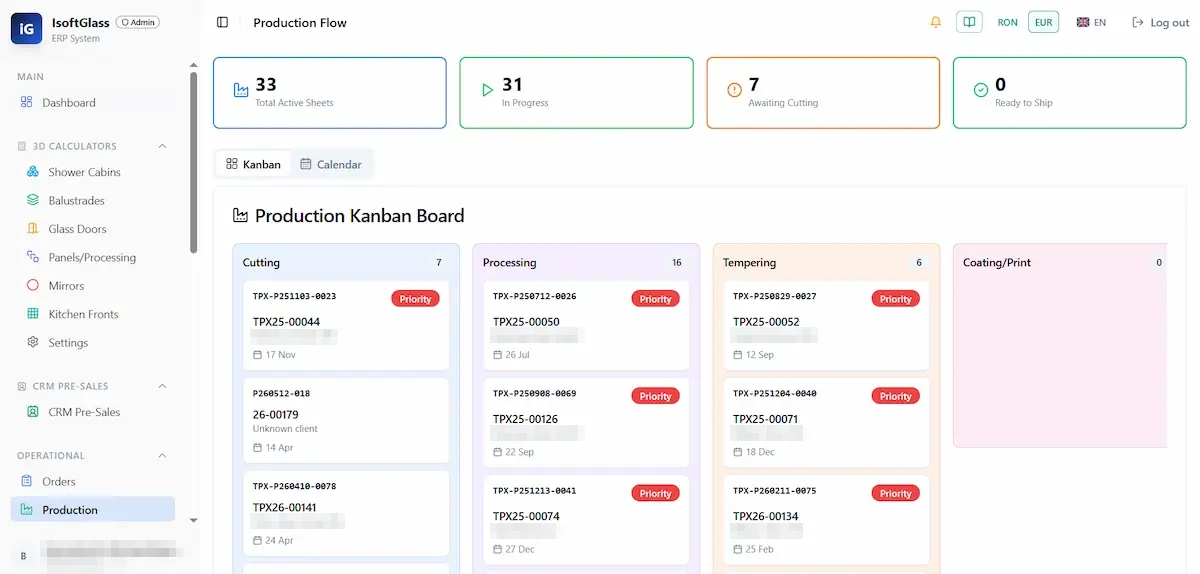
The workshop needs a production sheet generated from the order and a way to record progress, for example with barcode scanning, so the office sees where each piece is without asking.
4. Inventory
Glass, hardware and consumables should be reserved against orders and trigger alerts at minimum levels. Stock that does not follow orders is only a list.
5. Processing and cutting optimization
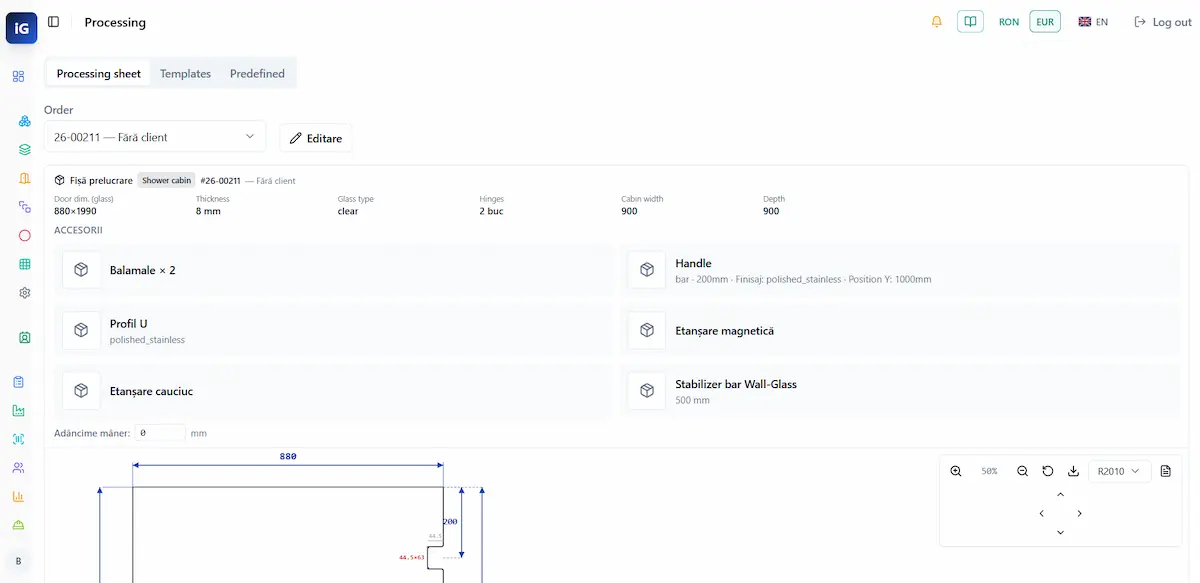
Processing sheets with the hardware and drawing for each piece belong in the same system as the order. For processors that cut sheets, optimized layouts are where material cost falls. See glass cutting optimization software for how to size the saving.
6. Reporting and complaints
Dashboards, reports and a complaints process turn daily data into decisions and keep service issues from getting lost. The view managers get of this data is covered in glass management software for fabricators.
Want to test glass ERP software on your own products?
Start the 14-day free trial and quote a real order.
How to introduce glass ERP software without stopping production
The usual fear is downtime. It helps to move in a fixed order and keep the old process running until the new one has proved itself.
- Import your data. Start with the client list and the price rules per glass type and thickness.
- Train a small group first. One person from sales and one from the workshop is enough to find the gaps.
- Quote live orders. Run real quotes in the new system while the old files stay as backup.
- Move production and stock. Switch the workshop once quoting and orders are stable.
- Review after a month. Check which spreadsheets are still being opened, and why.
What to check before you choose glass ERP software
| Question | Why it matters |
|---|---|
| Does it understand your products? | Generic fields for width and height produce generic mistakes. Ask for your own product on screen. |
| Is the order entered once? | Every re-entry between quote, production and stock brings the old problem back. |
| Can the workshop use it? | If production staff cannot use it on the floor, the data goes stale. |
| What is included in the price? | Check modules, users, updates, support and backups, and whether cutting optimization is extra. |
| How fast can you start? | A long setup delays the return. Ask what you will have working in the first week. |
| Can you try it first? | A free trial on your own products tells you more than a demo video. |
For a wider comparison of spreadsheets, generic ERP and dedicated tools, see the guide to best software for glass.
Who does not need glass ERP software?
Not every glass business needs a full system. Be honest about which group you are in before you pay for modules you will not use.
- Installers who only fit glass bought already cut. If you do not process glass and mainly need accurate quotes, a set of product calculators may be enough. In iSoftGlass that is the €60 plan, covered on the glass calculation software page.
- Very small workshops with a handful of orders a week. If re-typing costs you less than the plan, a spreadsheet can still work. Use the break-even check below with your own numbers.
- Companies looking for accounting or payroll. Glass ERP software focuses on quoting, orders, production and stock. Check what a vendor covers, and keep your accounting tool if it does not.
You are a good fit when several people touch the same order, orders carry hardware or processing, and mistakes in dimensions lead to remakes.
Glass ERP software in iSoftGlass: modules, plans and price
iSoftGlass is cloud-based glass ERP software built only for glass processors and installers. Facts below come from the iSoftGlass website in October 2026.
| Topic | What iSoftGlass states |
|---|---|
| Calculators | Six product calculators: shower cabins, balustrades, glass doors, panels, mirrors and kitchen fronts. PDF quotes, client management and price settings. |
| Orders and production | Orders, production, production scanner, clients and reports. Production sheet generated from a confirmed order. |
| Stock and service | Inventory with alerts, and a complaints and service module. |
| Processing | Processing sheets, CAD editor and cutting optimization, in the €150 plan. |
| Plans | Calculators: €60 per month. Calculators + Operations: €100. Calculators + Operations + Processing: €150. |
| Terms | No setup fees, cancel anytime. Free updates, support, cloud access, backup, multiple users and an interface in 11 languages in every plan. |
| Trial | 14-day free trial. |
Break-even check using the illustrative example above: the Calculators + Operations plan costs 12 × €100 = €1,200 a year, while the made-up re-entry cost is €7,800. At €15 an hour, saving about 80 hours a year, roughly an hour and a half a week, covers the plan. See the current plans on the iSoftGlass pricing page.
The right question is not “What does the software cost?” but “How many hours of re-typing does it need to remove before it pays for itself?”
Glass ERP software: frequently asked questions
The basics
What is glass ERP software?
Glass ERP software is business software built for glass companies that connects quoting, orders, production, stock, delivery and reporting in one system. It replaces spreadsheets and separate tools with a single record for every order.
How is glass ERP software different from a generic ERP?
A generic ERP is built around standard items and stock lines. Glass ERP software understands made-to-measure products: dimensions, glass type and thickness, hardware, processing and assembly. Quoting, production sheets and stock reservation follow from those inputs instead of being set up by hand.
Is glass ERP software the same as glass manufacturing software?
They describe the same category from two angles. Glass manufacturing software is the broader term for tools that run a glass workshop. Glass ERP software emphasises the business-wide record: customers, orders, stock and reporting in one place.
Cost and getting started
How much does glass ERP software cost?
Prices vary by vendor and by what is included. iSoftGlass lists three monthly plans in euros in October 2026: Calculators at €60, Calculators + Operations at €100 and Calculators + Operations + Processing at €150, with no setup fees and cancellation at any time.
How long does it take to start using glass ERP software?
It depends on how much data you bring and how many people use it. iSoftGlass states it is designed to go live in days rather than months. A practical sequence is to import clients, set prices per glass type and thickness, train the team and then quote live orders.
Can a small glass shop use glass ERP software?
Yes. Smaller businesses can start with a quoting plan and add operations later. In iSoftGlass the Calculators plan at €60 per month covers six product calculators, PDF quotes, client management and price settings.
Switching from Excel and trying it
Does glass ERP software replace Excel?
For quoting, orders, stock and production it can, because the same data is entered once and reused. Many teams still keep Excel for ad-hoc analysis, but it no longer carries the order process.
Is there a free trial of iSoftGlass?
Yes. iSoftGlass offers a 14-day free trial. You can create an account in the application and test quoting before choosing a plan.
Try glass ERP software on your own orders for 14 days
Create your account, quote a real order and see it move from quote to delivery in one system. No setup fees. Cancel anytime.
Sources: iSoftGlass – Pricing · iSoftGlass – Operational module · iSoftGlass – Calculators. External: Powell, Baker and Lawson – Errors in Operational Spreadsheets (2009) · Wikipedia – Enterprise resource planning. Prices checked October 2026. Re-entry figures are illustrative.